How to transfer/copy settings from one robot or device to another? #
You can copy optimized settings, which may include
- robot parameters (including exporter parameters and tex-tmodifyers)
- Feasibility mal parameters
- Specific planner parameters
- Program importer parameters (for some robot manufacturers only)
- Associated devices (external axes)
from one robot (or other device) to several robots (or other devices) of your choice. This is especially helpful if you made some optimizations (late in the project) for one workflow or on robot of many in a workflow and want the others to apply the same settings. If it is early in the project, you simply duplicate the workflow which includes the settings.
Select the device (her the FANUC robot) which was optimized and which settings shall be used by all other FANUC robots.
“Copy device specific parameters to”
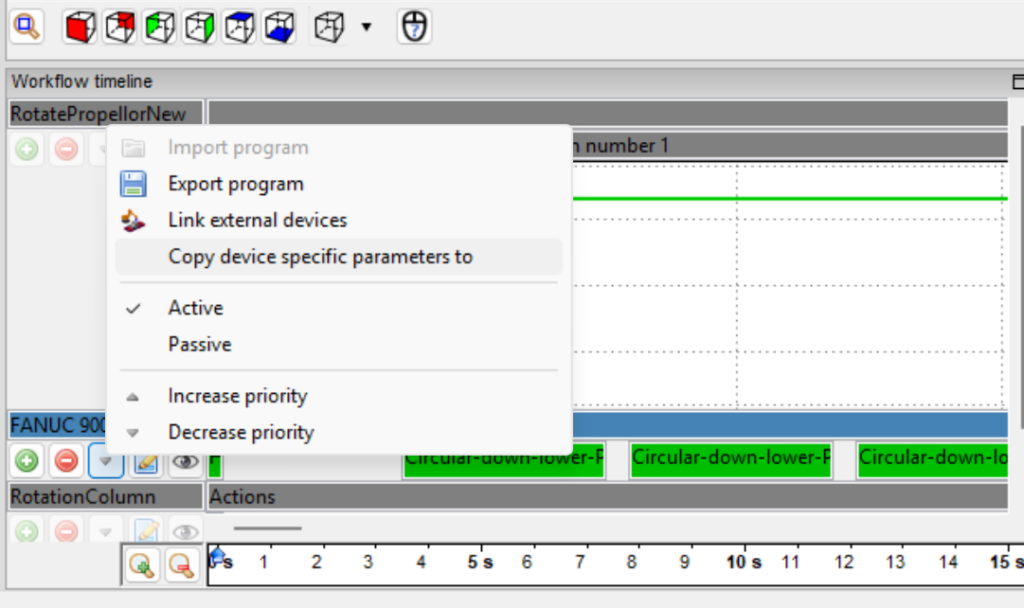
Image:
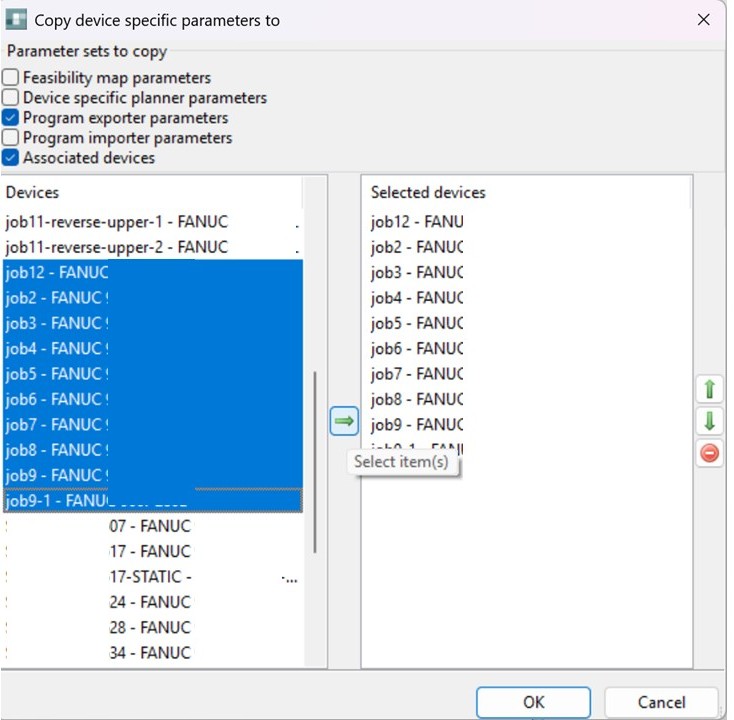
You can select the following parameter sets to be copied to other FANUC robots to be defined subsequently:
- Feasibilty Maps parameters:
- Device Specific Planner parameters:
- Program Exporter Parameters, such as Base frame, speed settings, linear or ptp, sampling a.s.o.
- Program importer parameters:
- associated devices, e.g. which external axis are connected

Image:
Final steps:
- Select the devices parameters to copy / transfer
- select the robots to copy them to. note: devices should be of same kind. Do not copy the settings of an external axis to a robot.
- Press the transfer button in the center and the target devices are shown
- Add mode devices if wanted
- Press OK